
Published 29 October 2026 | Updated 30 October 2026
technology
6 Figma and PSD to HTML Email Template Coding Services: Cart Blocks and Dark Mode
You perfect a Figma frame or layered PSD, yet Outlook unravels the layout, and Gmail strips your styles. That fragile hand-off, from static mock-up to inbox-safe HTML, is exactly why Figma- and PSD-to-HTML coding services exist.
In 2026, Apple Mail and Gmail deliver nearly 90 percent of tracked opens, and more than one quarter of those views now happen in dark mode (Litmus). If your template can’t survive inversion, cart-data loops, or ESP rewrites, revenue leaks fast.
So in this guide, we compare six coding options, managed agencies and Figma plugins, so you can match turnaround, price, and QA ownership to your team’s reality.
- Choose the right coding model: Managed HTML email coding services handle development, testing, and revisions, while Figma plugins offer faster exports but require in-house QA.
- Compare services based on your needs: InboxArmy suits ongoing production, Email Uplers focuses on fast turnaround, XHTMLTEAM offers tiered options, and MailBakery works well for one-off templates.
- Consider Figma-native tools: Emailify supports Klaviyo workflows and dynamic cart emails, while Email Love focuses on reusable design systems, MJML exports, and AI-assisted creation.
- Dark-mode compatibility is essential: A reliable HTML email template should maintain readable text, visible logos, and consistent branding across supported light- and dark-mode email clients.
- Test dynamic cart blocks before launch: Ecommerce templates should correctly display multiple products, images, quantities, prices, and checkout links using real ESP event data.
- Never skip email QA: Test templates across Gmail, Outlook, Apple Mail, mobile devices, and your chosen ESP before sending campaigns.
- Prioritize proven quality over low pricing: Ask providers for testing screenshots, revision policies, turnaround commitments, and post-delivery support before choosing a service.
Quick comparison of the six services
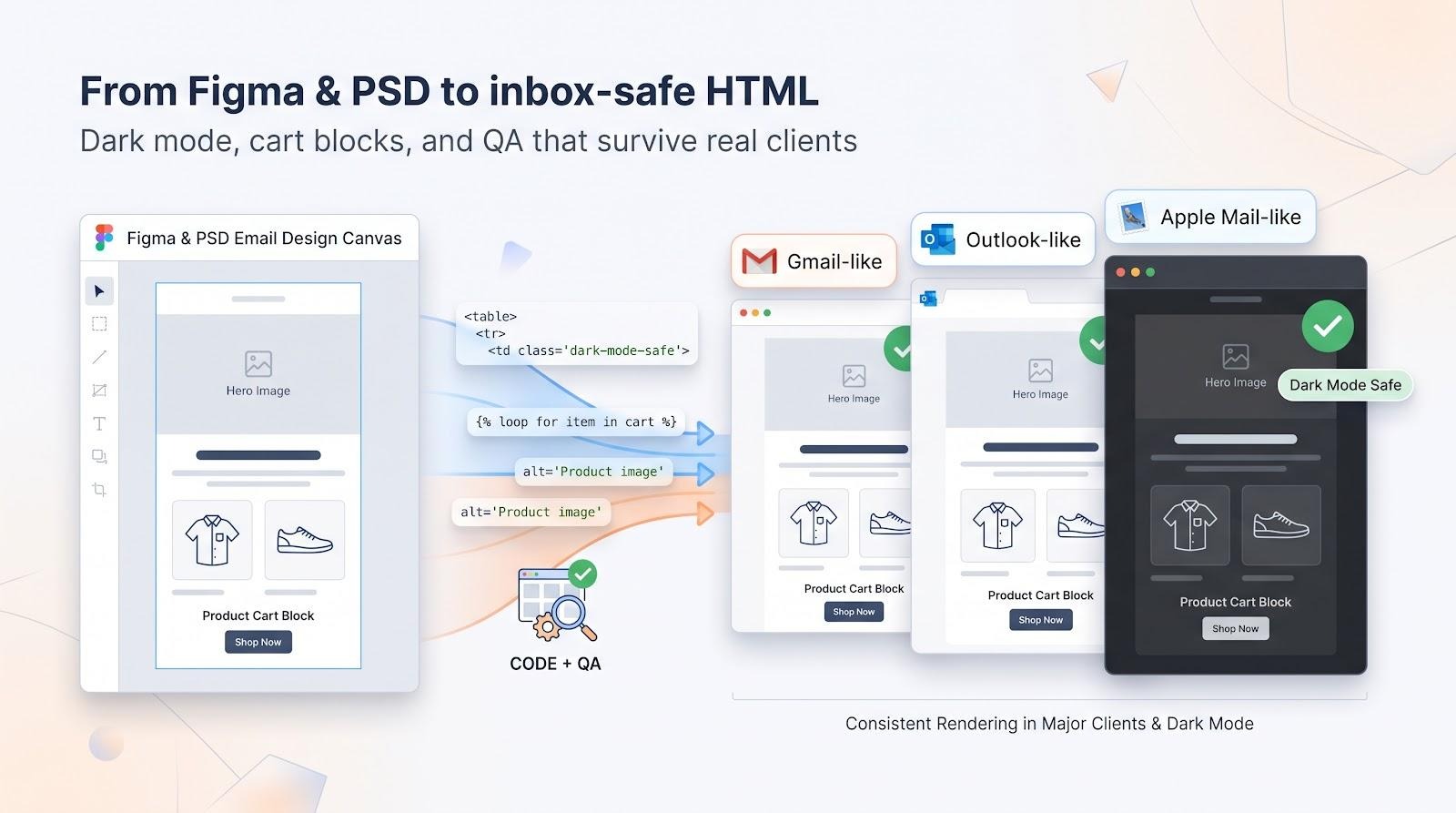
We built this snapshot to help you decide whether to keep reading. The grid below covers nine must-ask checks for each provider: inputs, speed, QA evidence, dark-mode proof, dynamic cart support, and more.
| Service | Model | Figma | PSD | Start price* | Turnaround | Test evidence | Dark-mode proof | Cart-block proof | Best-fit use |
| InboxArmy | Managed agency | Yes | Yes | Quote | Overnight | Tested on 40+ email clients | Not publicly documented | Automation expertise; dynamic loop confirmation needed | Embedded production teams |
| Email Uplers | Managed agency | Yes | Yes | $59 | 4-8 hrs | Litmus report | Available; base tier unclear | Klaviyo multi-item tables | Urgent, high-volume coding |
| XHTMLTEAM | Managed agency | Yes | Yes | $99 | 24-48 hrs | Litmus or Email on Acid† | Itemised in Advanced tier | Generic dynamic modules | Tiered dark-mode needs |
| MailBakery | Managed agency | Yes | Yes | $98 | < 24 hrs | Litmus link plus screenshots | Sample captures | Not publicly documented | One-off hand-coded builds |
| Emailify | Figma plugin | Yes | No | $49/seat/mo | Instant | Litmus tutorial | Overrides for supported clients | Klaviyo abandoned-cart tutorial | Figma-native Klaviyo flows |
| Email Love | Figma plugin | Yes | No | Free / $19+ | Instant | Buyer runs tests | Dark-mode preview | Not publicly documented | Design systems & AI assists |
*Public price as of September 2026.
†Included in Advanced tier.
Two patterns emerge:
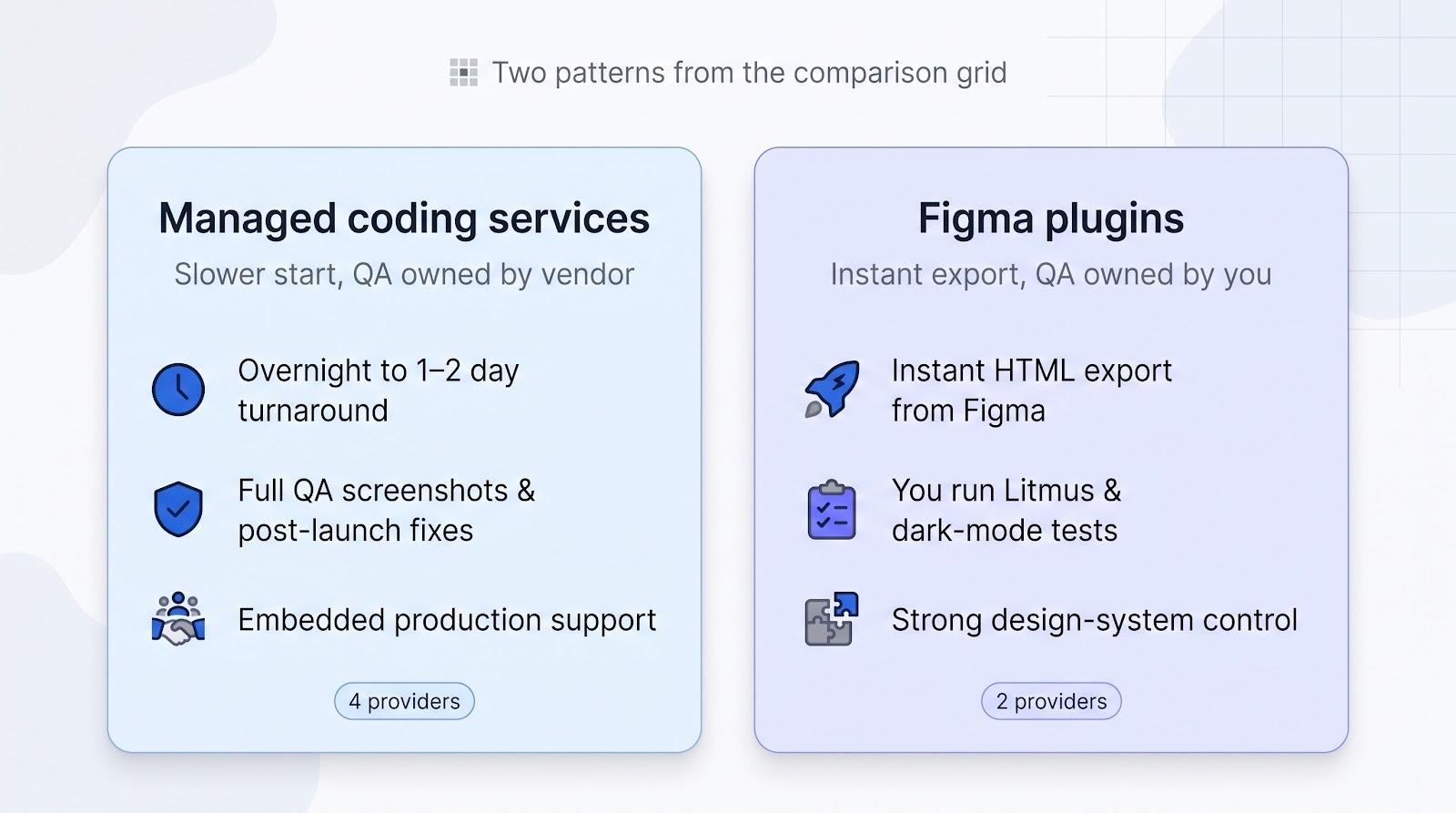
- Managed agencies start slower but own QA and post-launch fixes.
- Plugins export instantly yet leave inbox testing and revisions in your hands.
Next, we unpack why those checkpoints matter and how we scored each provider’s evidence, not just the promises on a marketing page.
How we picked and scored each service
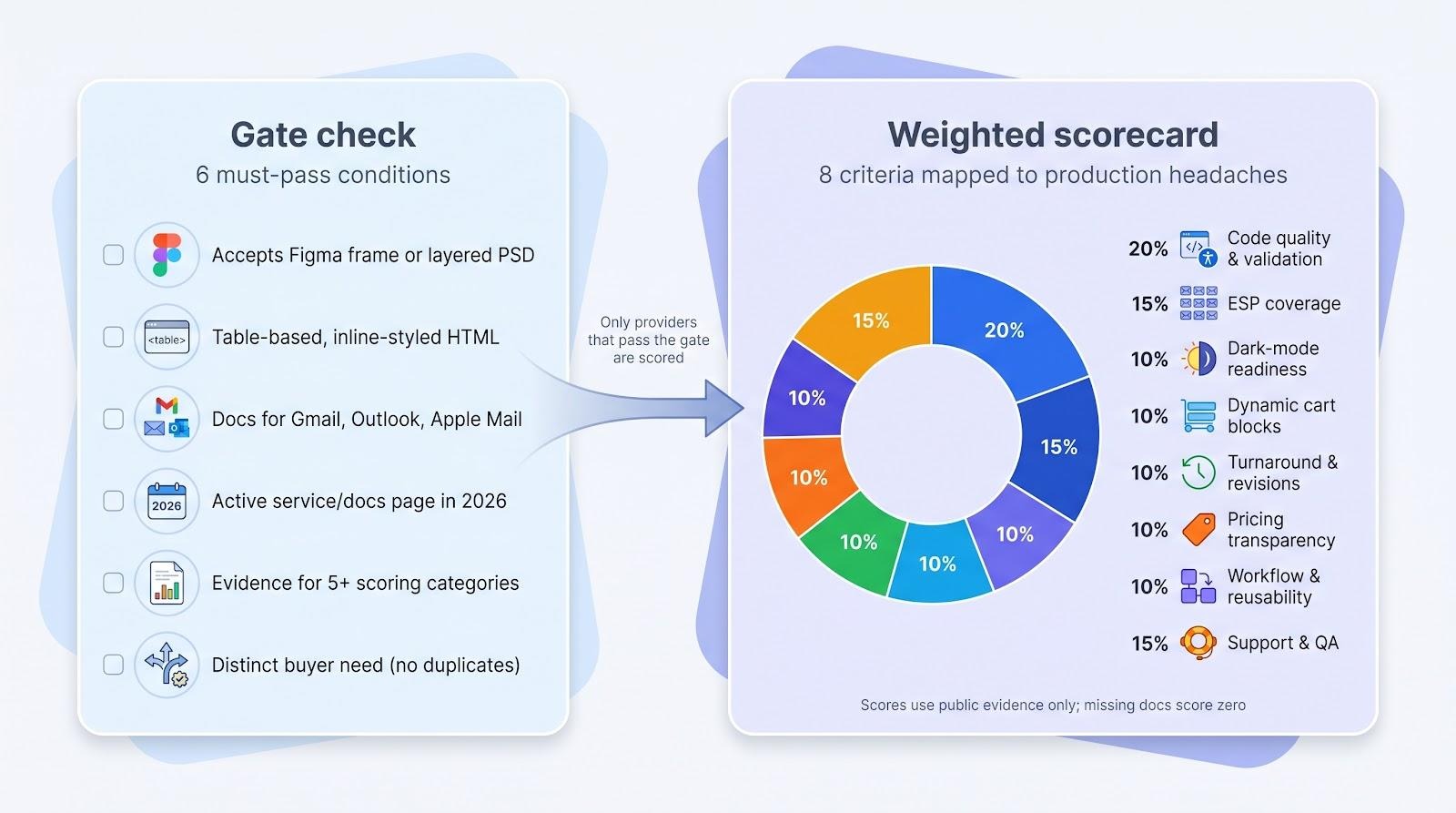
A clear rubric keeps this comparison honest. We used two filters, qualification gates and weighted scores, so only providers with documented, inbox-safe practices made the list.
Gate check
A provider qualified only if it met all six of these conditions:
- Accepts a Figma frame, layered PSD, or exports directly from Figma.
- Produces table-based, inline-styled HTML proven to work in email clients.
- Publicly documents responsive support and lists major clients such as Gmail, Outlook, and Apple Mail.
- Maintains an active service or documentation page in 2026.
- Publishes evidence for at least five of the scoring categories below.
- Serves a distinct buyer need rather than duplicating another entrant.
Weighted scorecard
We applied eight criteria that map to common production headaches:
- Code quality and validation (20 percent): VML, MSO, fallback fonts, accessibility; screenshots beat slogans.
- ESP coverage (15 percent): Tested support for 40+ platforms, not just Mailchimp logos.
- Dark-mode readiness (10 percent): Explicit overrides and proof, not a “dark-mode friendly” claim.
- Dynamic cart blocks (10 percent): Multi-item loops and event tests; vague “Klaviyo compatible” earns zero.
- Turnaround and revisions (10 percent): Written SLAs plus a bug-fix window.
- Pricing transparency (10 percent): Public numbers or tier grids beat “contact us.”
- Workflow and reusability (10 percent): Modules, editable regions, and Figma components.
- Support and QA (15 percent): Named tools, screenshot grids, and human follow-through.
We scored only what each provider proves in public. Missing documentation equals zero, even if the work is available on request, so transparency lifts the final grade. These scores measure evidence, not lab-tested render quality, but they let you see who puts proof on the page before you reach for your wallet.
Managed coding service or Figma plugin: which model fits your team?
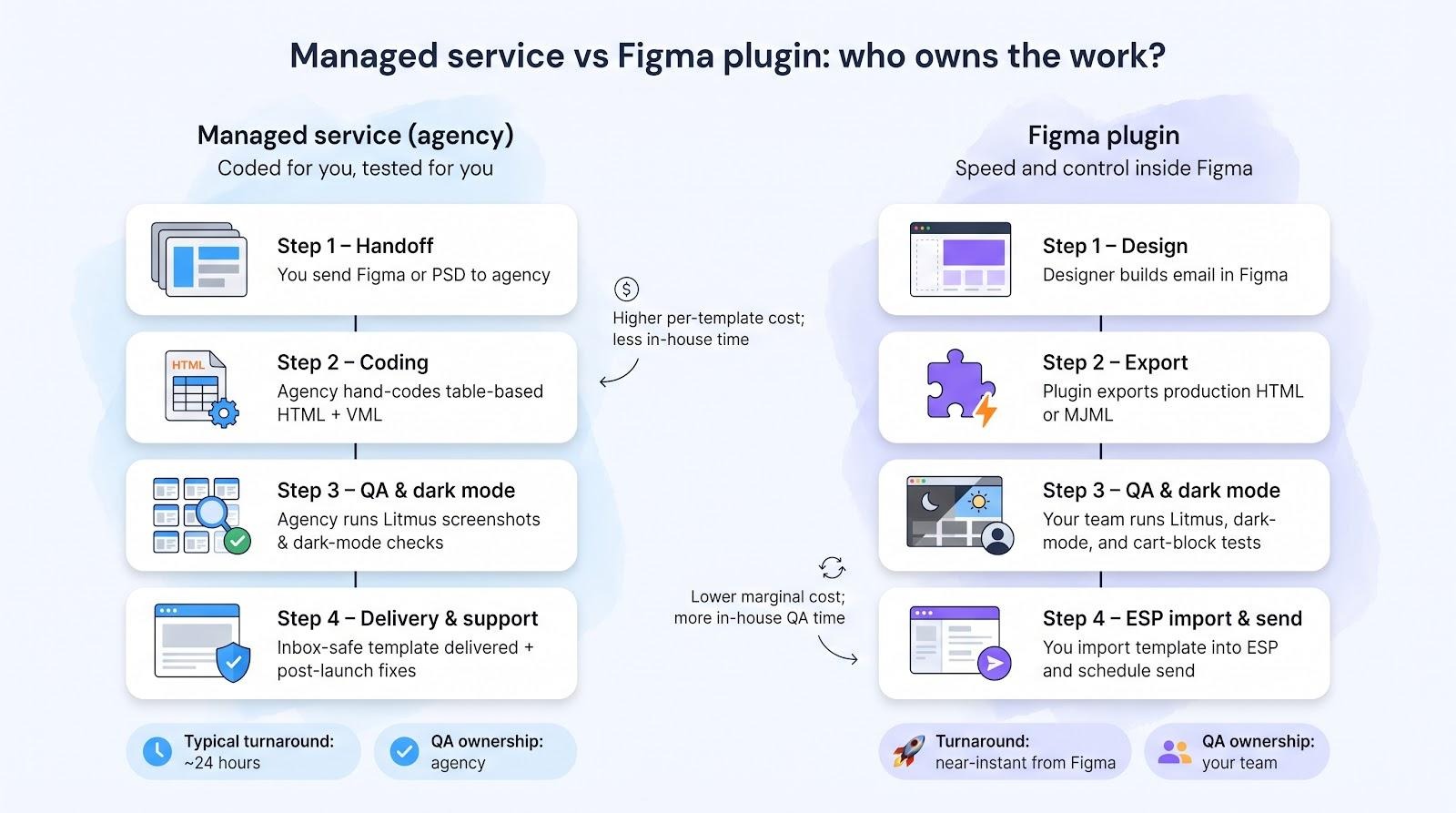
Managed service: coded for you, tested for you
Launch week is chaotic: copy changes at night, executives view drafts in Outlook, and the send date doesn’t move. A managed agency such as InboxArmy, Email Uplers, or a similar team takes the design file, applies table-based HTML, runs Litmus screenshots, and returns an inbox-safe template, often within 24 hours. You pay more than a plugin, but you also get written SLAs, post-launch fixes, and someone else chasing VML quirks and dark-mode contrast.
Choose this route when
- campaign volume spikes beyond your in-house bandwidth, or
- your team lacks a developer who enjoys debugging Outlook.
Figma plugin: speed and control inside the design file
If designers build every email in Figma and you send several campaigns a week, a plugin can remove handoffs. Emailify, for example, exports production HTML in seconds and costs about $49 per seat per month, often cheaper than one outsourced template once volume grows. Because the workflow stays inside Figma, brand typography and spacing remain locked in components, and quick edits ship fast.
Trade-off: you own QA. Plan for a Litmus pass, a dark-mode sweep, and a live cart-block test before each send. Skipping those steps can turn saved hours into late-night troubleshooting.
Choose a plugin when
- design skills are strong in-house,
- campaign cadence is predictable, and
- someone is responsible for testing every build.
Both models work; the right choice comes down to whether your bottleneck is coding capacity or QA discipline.
InboxArmy: best for an embedded, multi-ESP production team
InboxArmy’s HTML email template coding services position the agency as an extension of your marketing staff, not a one-off contractor.
- Breadth of inputs and outputs. The team converts Figma, PSD, Sketch, and XD files into responsive, table-based HTML that has been pre-tested in more than 40 email clients and mapped to 40+ ESPs.
- One account manager. The same account manager handles your template production from brief to delivery, so Outlook VML quirks, mobile breakpoints, and ESP-specific merge tags are fixed by people who already know your brand.
- Lifecycle support. Beyond campaigns, InboxArmy also builds cart abandonment and browse abandonment automations, so the same team can code your triggered flows and your newsletters.
- Turnaround promise. The agency advertises overnight delivery for most templates, but confirm the written SLA, especially for dark-mode overrides and Klaviyo dynamic loops, which are not publicly documented.
- Pricing transparency. No public rate card exists; ask about revision limits and custom dynamic-block fees before kickoff.
InboxArmy fits brands or agencies that need continuous production across multiple ESPs and value a partner who owns QA and post-launch fixes.
Email Uplers: best for urgent and high-volume template production
Email Uplers markets speed above all: hand-coded, responsive HTML from a Figma or PSD file in as little as 4 hours (another page quotes 8 hours). Entry pricing starts at $59 per template.
Why the rush fee can pay off
- Broad compatibility. Public docs list support for 50+ ESPs and 40+ email clients, with Litmus screenshots included in every delivery.
- Scale on demand. A large production bench (Email Uplers cites 150+ email experts across coding, QA, and design) can build dozens of templates in parallel and keep styles consistent through modular blocks.
- Post-launch safety net. Modular templates are priced to order, so ask for the post-delivery support window in writing.
- Ecommerce proof. Ask for a Klaviyo dynamic-block sample before booking, so the marketing claim becomes a replicable checklist.
Points to confirm before you book the rush slot
- Which turnaround applies to your order, 4 hours or 8 hours?
- Does the base $59 tier include dark-mode overrides, or are they an add-on?
- Revision rounds are not itemised on the public pages, so ask how many are included before a build with multiple approvers.
Pick Email Uplers when speed is non-negotiable and your queue demands dozens of tested templates each month; just lock the exact SLA and scope in writing first.
XHTMLTEAM: best for tiered dark-mode and testing options
XHTMLTEAM publishes a clear three-tier menu:
| Tier | Price | Key add-ons |
| Starter | $99 | Responsive, hand-coded HTML |
| Pro | $149 | ESP-ready code, accessibility practices, reusable modules |
| Advanced | $299 | Light and dark mode optimization plus Email on Acid previews for 40+ clients and devices |
Core deliverables stay constant: table-based HTML that survives Gmail quirks and Outlook rendering, delivered as clean, editable code. The order page promises “unlimited free revisions until you're fully satisfied,” which keeps change orders predictable.
Where it stands out
- Dark mode on the top tier. The service page calls every build dark-mode ready, but the itemised light and dark mode optimization sits in the Advanced tier, so confirm what the lower tiers include.
- A la carte QA. Full screenshot packs come with the Advanced tier; lower tiers skip the cost.
- Predictable timing. The site quotes 24 to 48 hours for most builds, offers rush delivery on the Pro and Advanced tiers, and gives existing clients weekend support (confirm in writing).
Watch-outs
- Ecommerce depth is thin; no public Klaviyo cart-loop demo. Request a sample if abandoned-cart revenue is critical.
- Confirm turnaround and revision windows for holiday or rush periods.
If you like checkout-style clarity and prefer to pay only for the extras your campaign demands, XHTMLTEAM’s tiered model beats one-price-fits-all competitors.
MailBakery: best for one-off hand-coded templates with screenshot QA
MailBakery specializes in single, high-stakes emails rather than ongoing production.
What you get
- Hand-coded HTML in about 24 hours. Developers slice your Figma or PSD file into table-based, inline-styled code; the site quotes “within 24 hours” for most jobs (confirm the SLA).
- Screenshot proof. Builds are tested on 40+ email clients, you get the Litmus test link, and screenshots covering Gmail, Outlook, Apple Mail, mobile apps, and dark mode are available with the file.
What to confirm
- Pricing is quoted per job: the service page says “starting from $98,” and the order form returns a final price after review, so budget above the floor for complex layouts.
- Revisions are unlimited for bug fixes and minor tweaks; additions and sizable changes are quoted separately, so agree the scope before the first build.
- No documented Klaviyo dynamic tables or modular frameworks, so this fits seasonal blasts or executive announcements, not automated flows.
Choose MailBakery when you need one flawless template, full screenshot evidence, and no ongoing subscription, provided the price and revision window suit your timeline.
Emailify: best Figma-native option for Klaviyo cart emails
Emailify keeps the entire workflow inside Figma. Design with its component library, click Export, and receive production-ready HTML or MJML in seconds.
Why it works for ecommerce
- 40+ export presets include Klaviyo, Braze, HubSpot, Salesforce, raw HTML, and more, so merge tags and unsubscribe links land correctly (according to Emailify documentation).
- Abandoned-cart tutorial. A step-by-step guide loops through multi-item arrays and previews live data in Klaviyo before send.
- Honest dark-mode docs. Emailify previews dark mode with custom color overrides and image swaps for the clients that support them, and points you to Can I Email for the support matrix rather than promising uniform results.
- Predictable cost. $49 per seat per month or $499 per year, with ten free Pro exports to test-drive.
Limits to note
- Designs must use Emailify layout components; arbitrary Figma frames require re-mapping.
- QA stays on your team. The plugin links with Litmus and Email on Acid, but you run the tests.
- Cart-block code ships, yet you still need to validate merge tags after importing to Klaviyo.
Choose Emailify when you need rapid iteration, component control, and lifecycle automation more than outsourced QA. It turns designers into production engineers without handing off to a separate dev queue.
Email Love: best for design systems, MJML, and AI-assisted workflows
Email Love focuses on design-system governance inside Figma. Drop its components (headers, product cards, footers) into a file, lock brand tokens, and export either raw HTML or MJML with one click.
Stand-out features
- AI draft builder. Give it a brief and the plugin builds a real email from your published Email Love components on the Figma canvas, ready for your team to edit, review, and export. You still polish copy and test, but first-draft speed is the selling point (per Email Love documentation).
- Design-system support. Shared libraries keep typography, colors, and spacing consistent across every export.
- Dark-mode preview. A dark mode preview surfaces inversion issues before export.
- Freemium pricing. Free tier with five exports a month; Starter is $19 per user per month for ten exports; Growth is $59 per user per month for unlimited exports and five shared design systems.
Limits to confirm
- No built-in Klaviyo cart-loop workflow, so hand-code multi-item blocks or use an agency partner.
- QA and deliverability stay on your team; run your own Litmus or Email on Acid pass before send.
- AI output still needs human review; treat it as a draft, not final code.
Choose Email Love when brand consistency, quick ideation, and MJML flexibility matter more than automated QA or dynamic ecommerce blocks.
What “dark-mode ready” really means
Many service pages promise a “dark-mode friendly” template, but the term hides big gaps. Use our three-step ladder to judge any claim.
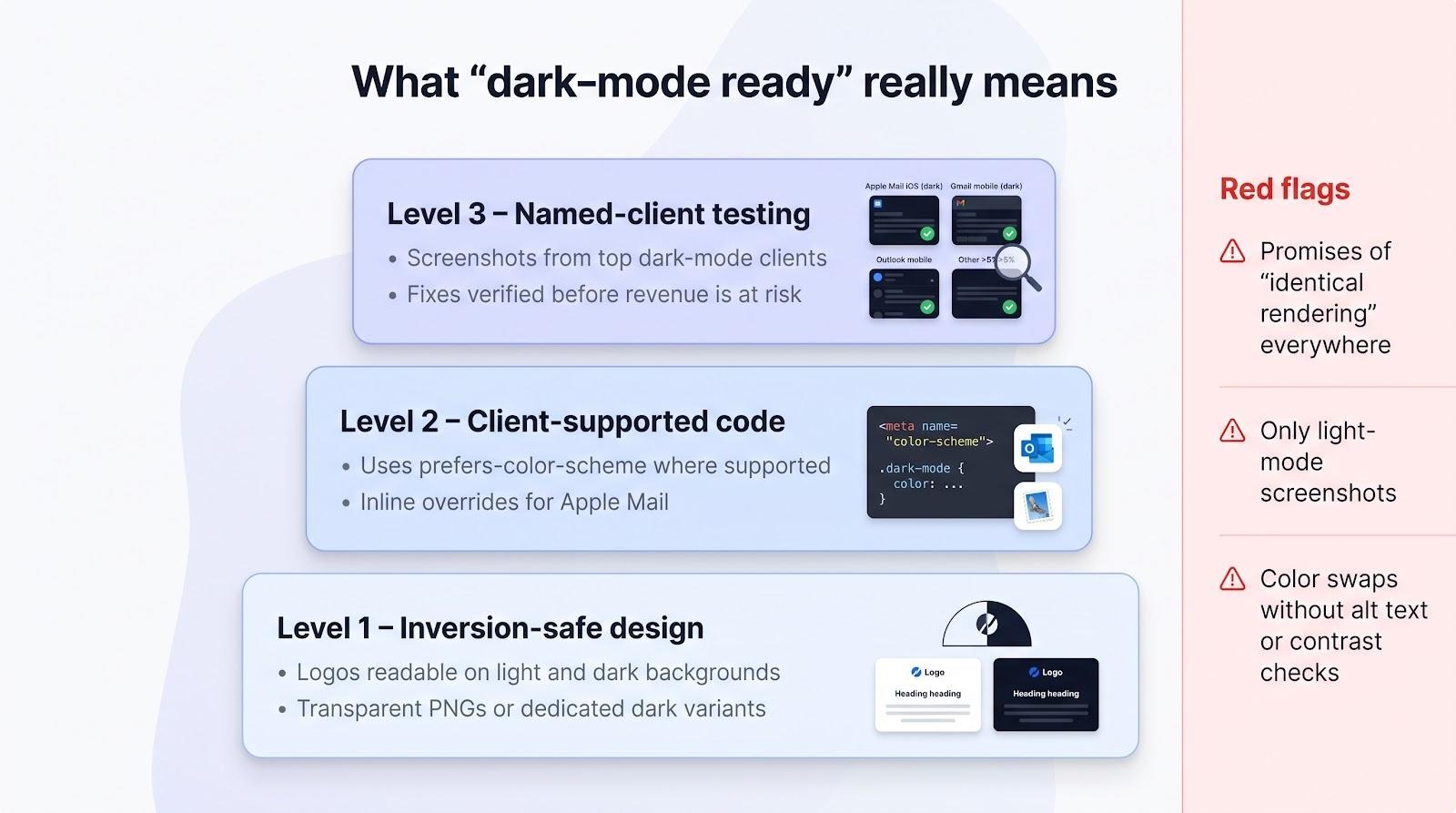
Level 1: inversion-safe design
Logos must keep contrast on both black and white backgrounds. Images need transparent PNGs or dedicated dark variants. Copy can’t rely on hue alone to show state or hierarchy.
Level 2: client-supported code
Apple Mail honors prefers-color-scheme; Outlook (iOS / Android) supports a subset; Gmail still applies its own algorithmic inversion. Emailify’s docs limit custom overrides and image swaps to supported clients, and Gmail and Outlook may still repaint colors on their own. A “dark-mode ready” build therefore includes:
- Color-scheme meta tags for clients that read them
- Conditional classes or inline styles for Apple Mail
- Text and icons that stay legible if a client ignores your CSS
Level 3: named-client testing
Finish with screenshots from the clients that dominate your list, usually Apple Mail (iOS / macOS), Gmail mobile dark mode, Outlook mobile, and any other client over five percent of opens. Catch a vanishing logo here, not in the revenue report.
Red flags
- Promises of “identical rendering” everywhere. No CSS can force that.
- Test reports that show only light-mode captures.
- Color swaps without alt text; accessibility breaks if images fail.
How to evaluate ecommerce cart-block support
Klaviyo’s 2024 benchmark report, built on 2023 data from more than 143,000 flows, puts abandoned-cart flows at an average $3.65 in revenue per recipient and $28.89 for the top 10 percent; that lift depends on one element: a dynamic cart table.
1. Confirm the trigger
Abandoned-cart events usually include an array of items, while Added to Cart or Viewed Product events often contain just one product. Hard-coding a single row breaks the moment a shopper adds two items. Ask the provider which event they support and request a multi-item preview inside your ESP.
2. Require these data fields
- Product image
- Product name and variant
- Quantity
- Unit price and line total (if policy allows)
- Return-to-cart or checkout URL
- Fallback text for any missing field
Missing even one can stall recovery revenue.
3. Seven vetting questions
- Will you use the ESP’s native loop syntax, not static HTML?
- Do you test with payloads of 1, 3, and 10 items?
- What happens when an image URL is blank?
- After import, is the block still editable in the visual builder?
- Which clients, light and dark, appear in the screenshot report?
- How many revision rounds cover data-edge bugs?
- Can you supply both HTML and builder-native versions for A/B speed tests?
4. Verify the connector
A template can display only the data your platform passes. If you use OpenCart or a custom stack, confirm that image URLs, variants, and return links reach the ESP; otherwise even perfect code renders empty blocks.
Dynamic cart loops turn design into dollars. Choose a provider that proves the loop inside your account instead of relying on a generic “Klaviyo compatible” claim.
The code-and-QA checklist to send every provider
A glossy landing page is worthless if the finished HTML breaks in the inbox. Send this checklist to every shortlisted vendor; their answers reveal whether they ship revenue-safe code or future headaches.
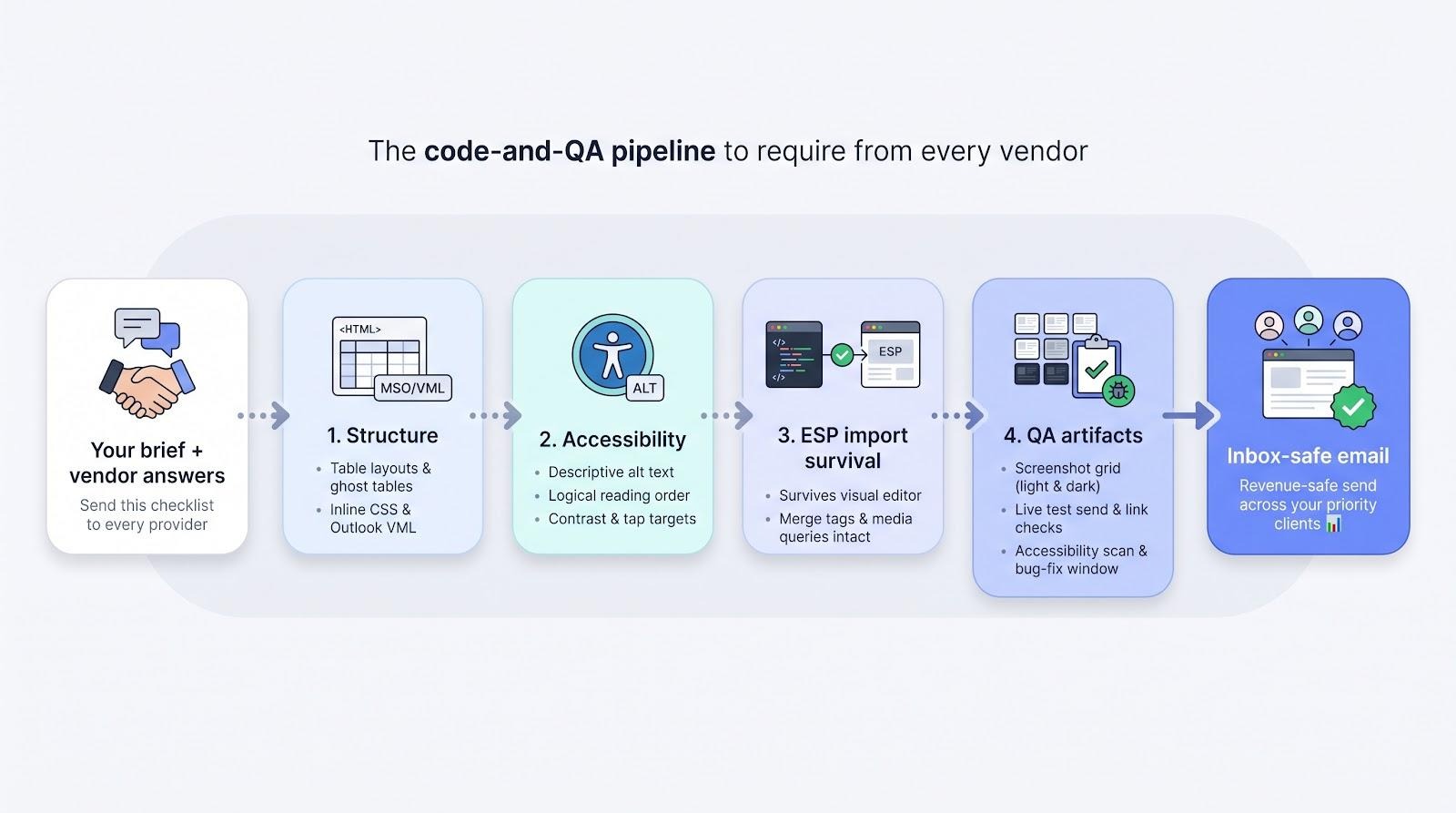
1. Structure
Ask how they build table layouts, inline CSS, and Outlook-specific VML. Experienced coders will mention ghost tables, conditional comments, and mobile stacking. If the reply leans on div layouts, reconsider.
2. Accessibility
Require:
- Descriptive alt text
- Logical reading order
- Sufficient color contrast
- Touch-friendly tap targets
Many brands still skip basic alt text, so don’t be one of them.
3. ESP import survival
Visual editors often strip media queries or merge tags. Insist on a post-import test showing the template inside your ESP, not just the vendor’s sandbox.
4. QA artifacts
A solid package includes:
- Screenshot grid for your priority clients (light and dark)
- Live test send you can open on multiple devices
- Link and tracking validation report
- Accessibility scan summary
- Written bug-fix window (five business days is common)
If a provider hesitates on any point, they likely treat QA as optional. Your revenue will pay for that shortcut, so sign only with teams that embed testing into their build process.
Specialized features that may justify a higher price
Most teams need only clean code, dark-mode resilience, and dynamic data hooks. The extras below can pay off, but only when a specific business goal demands them.
AMP for Email
Interactive forms and real-time inventory can lift conversions, but AMP also requires:
- A plain-HTML fallback for clients that block AMP, and
- An ESP that supports AMP sends, and mailbox providers that render AMP, such as Gmail and Yahoo Mail.
Few coding shops scope AMP templates and handle the Google sender registration, so ask each provider directly. Confirm ongoing support costs before you approve the build.
Gmail Promotions annotations and Deal Cards
JSON-LD markup lets Gmail add a price badge or countdown timer in the Promotions tab. Ask whether the coder can preserve that schema through minification, ESP rewrites, and tracking redirects.
White-label production
InboxArmy will sign a mutual NDA and offers white-label email marketing for agencies, and XHTMLTEAM advertises NDA-backed white-label coding, which is useful if you resell the work to clients. Ask Email Uplers for its white-label terms in writing.
BIMI and brand authentication
A logo next to the sender name boosts trust, but BIMI requires aligned SPF, DKIM, and DMARC records, plus a vetted brand certificate. Treat it as a separate deliverability project unless the provider offers end-to-end help.
Figma plugin accelerators and AI
Emailify and Email Love let designers export HTML or MJML and even draft layouts from a text prompt. Speed is high, but QA stays on your team, so budget at least one full Litmus pass before each send.
Frequently Asked Questions
Quick answers related to this article from PerfectionGeeks.
1. What is the best Figma and PSD to HTML email template coding service?
2. How much does Figma or PSD to HTML email conversion cost?
3. Why is dark-mode testing important for HTML email templates?
4. Can Figma to HTML email templates support dynamic abandoned-cart emails?
Conclusion
Upgrade only when you can tie new features to measurable lift: higher click-through rates, faster production, or stronger brand recognition. Otherwise, reliable HTML plus proven dark-mode and data practices will serve most teams best.

Devanshi specializes in SEO-focused content for AI, web, and mobile app development. She crafts user-centric, search-optimized content that enhances online visibility, strengthens brand authority, and supports sustainable organic growth through strategic content marketing and audience-focused communication.