Published 7 October 2025 | Updated 21 October 2026
app-development
How to Develop an App Like Paramount Plus in 2026: Features, Cost & Complete Guide
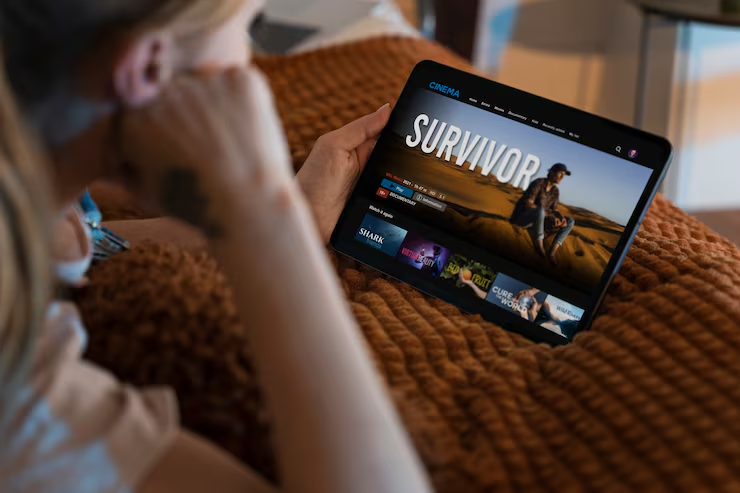
Building a video streaming app like Paramount+ can help businesses enter the OTT (Over-the-Top) entertainment market with their own digital platform. From movies and TV shows to live events and exclusive content, streaming apps allow users to watch entertainment on smartphones, smart TVs, tablets, and web browsers.
However, launching a successful streaming platform requires more than a video player. You need a content management system, subscription billing, secure video delivery, personalized recommendations, and a smooth viewing experience across devices.
Quick answer
How Do You Build an App Like Paramount Plus?
To develop an app like Paramount+, define your target audience, select your content model, design the user experience, and build the streaming application and backend infrastructure.
The process typically includes:
- Research the market and define your streaming niche.
- Choose a business and monetization model.
- Finalize the MVP features and supported devices.
- Design the application UI/UX.
- Develop the frontend, backend, and content management system.
- Integrate video hosting, streaming, and content protection.
- Add subscriptions, payment processing, and user authentication.
- Test playback quality, security, and device compatibility.
- Launch the platform and improve it using viewer feedback.
The most important decision is to build a platform around your own audience and content strategy rather than simply copying another streaming service's interface.
- Building an app like Paramount+ requires a user-facing streaming application, backend infrastructure, content management tools, and secure video delivery.
- Essential features include user profiles, video search, subscriptions, watchlists, adaptive streaming, playback history, and content recommendations.
- The estimated development cost can range from $25,000 for a limited-scope MVP to $200,000 or more for a complex, multi-platform streaming service.
- Video hosting, CDN usage, content licensing, DRM protection, and ongoing maintenance must be included in the business budget.
- Starting with a specific audience or content category can help businesses validate demand before expanding.
- PerfectionGeeks Technologies offers custom mobile application and software development services for businesses planning streaming platforms.
If you are planning to create a streaming service for movies, regional entertainment, sports, or original content, this guide explains how to develop an app like Paramount Plus, what features you need, how much it may cost, and how to turn your idea into a scalable OTT business.
This article is written for entrepreneurs, media companies, startups, and businesses looking for a video streaming app development partner.
What Is the Paramount+ App?

Paramount+ is a subscription-based streaming service offering movies, television shows, original programming, and other content, with availability and programming varying by market and subscription plan.
It provides an example of how a streaming platform can combine content discovery, video playback, subscriptions, and multi-device access in one digital experience.
Businesses planning a similar application can use this model to understand the core components of an OTT service.
A Paramount+-style platform may include:
- Movies and TV shows
- Original or exclusive programming
- Live channels or events, where supported
- User profiles and personalized recommendations
- Subscription management
- Watchlists and viewing history
- Multi-device access
- Parental controls
Your application does not need every feature from day one. A focused platform serving a specific audience can start with a smaller content library and essential streaming functionality.
Important: You can build a streaming app with similar functionality, but you must use your own branding and secure the necessary rights for all content. Paramount's name, logo, copyrighted content, and proprietary designs should not be copied without authorization.
Why Build a Video Streaming App Like Paramount Plus?
The OTT model offers businesses several ways to distribute content and build relationships with viewers.
1. Reach Viewers Across Devices
Users expect to access entertainment through mobile phones, tablets, computers, and smart TVs. A well-planned streaming platform can provide a consistent experience across supported devices.
2. Build a Subscription Business
A subscription model allows users to pay monthly or annually for access to selected content.
Businesses can test different pricing plans, premium tiers, and family packages based on audience demand.
3. Target a Specific Audience
You do not need a massive content library to launch a streaming service.
You could focus on regional movies, independent films, educational videos, children's programming, fitness content, or niche sports.
A clear focus can help your platform attract viewers who are not well served by general entertainment platforms.
4. Create Additional Revenue Streams
Depending on your content and business model, you can generate revenue through subscriptions, advertising, pay-per-view access, or a combination of these approaches.
5. Use Viewer Data to Improve the Experience
With appropriate privacy controls, analytics can help you understand which content viewers watch, when they stop watching, and which categories generate repeat visits.
These insights can guide content acquisition, product improvements, and marketing decisions.
Must-Have Features of an App Like Paramount Plus
Features play a major role in streaming quality, viewer engagement, and subscription retention. Start with the functions your audience needs most, then introduce advanced capabilities as the platform grows.
1. User Registration and Profiles
Allow users to create accounts, manage subscriptions, and maintain personal viewing preferences.
Multiple profiles can help families keep their watchlists, viewing history, and recommendations separate.
2. Video Streaming Player
The video player is the core of your application. It should support smooth playback, pause and resume, subtitles, audio selection, and playback quality controls where appropriate.
Adaptive bitrate streaming can automatically adjust video quality according to the viewer's available bandwidth and device capabilities.
3. Content Library and Categories
Organize movies and shows into categories such as drama, comedy, documentaries, regional entertainment, and new releases.
Each title should have a detail page with its description, thumbnail, release year, duration, language, age rating, and availability.
4. Search and Content Discovery
Users should be able to search by title, genre, language, actor, or other relevant metadata.
Filters and well-organized categories help viewers discover content without scrolling through the entire library.
5. Subscription and Payment Management
Provide a simple way to select a plan, pay, renew, upgrade, or cancel a subscription.
Your application should also manage entitlement checks, failed payments, subscription expiry, and access restrictions.
Payment methods and billing flows should be selected according to the target market and the applicable app-store policies.
6. Watchlist and Continue Watching
Let viewers save titles for later and resume content from where they stopped.
These features reduce friction and encourage users to return to the application.
7. Personalized Recommendations
A recommendation system can suggest content based on viewing history, selected interests, genres, and interactions.
For an MVP, you can begin with category-based recommendations and add more advanced machine-learning models after collecting sufficient data.
8. Parental Controls
Allow account owners to apply age-based content restrictions and PIN protection where required.
This is especially important for platforms offering family entertainment or children's programming.
9. Push Notifications
Send relevant notifications about new episodes, upcoming releases, expiring subscriptions, and account-related updates.
Notifications should be permission-based and easy to manage so they do not become intrusive.
10. Offline Downloads
If your content agreements permit it, let users download selected videos for offline viewing.
Offline access requires additional work involving encrypted storage, download management, expiry rules, and content protection.
Advanced Features for a Competitive OTT Streaming Platform
Once the basic streaming experience works reliably, you can consider additional features that improve engagement and support growth.
| Advanced Feature | Business Benefit |
|---|---|
| AI-powered recommendations | Helps viewers discover relevant content |
| Live streaming | Supports live events and selected channels |
| Multi-language subtitles | Makes content accessible to more audiences |
| Multiple audio tracks | Supports different language preferences |
| Smart TV applications | Expands access beyond mobile devices |
| DRM protection | Helps enforce digital content access rights |
| Advanced analytics | Measures engagement and subscription performance |
| Profiles for children | Supports age-appropriate viewing |
| Casting support | Allows playback on compatible screens |
| Content scheduling | Helps manage releases and live programming |
Choose these features according to your audience, content rights, budget, and launch goals.
Step-by-Step Process to Develop an App Like Paramount Plus
Developing an OTT application requires coordination between product design, application engineering, video infrastructure, content operations, and quality assurance.
Step 1: Identify Your Target Audience
Start by deciding who your streaming service will serve.
For example, you might target regional film viewers, independent filmmakers, sports audiences, children's entertainment, or educational content subscribers.
Research competitors, audience expectations, pricing sensitivity, and content availability before deciding what to build.
Step 2: Select Your Business Model
Choose how viewers will access your content and how the platform will earn revenue.
Your model affects the subscription system, payment integrations, content access rules, and advertising infrastructure.
Step 3: Plan the MVP
An MVP is the first functional version of your application.
A practical streaming MVP may include:
- User registration and profiles
- Content catalog and search
- Video playback
- Watchlist and viewing history
- Subscription management
- Admin content management
- Basic analytics
Start with the platforms most important to your audience. For example, a mobile-first product may launch on Android and iOS before adding smart TV applications.
Step 4: Design the UI/UX
Create wireframes and prototypes for the home screen, content details, search, video player, account settings, and subscription flow.
Make sure viewers can find and play content quickly. A clean interface should work well across different screen sizes and input methods.
Step 5: Build the Backend and Content Management System
The backend manages user accounts, subscriptions, content metadata, viewing progress, and application APIs.
The content management system (CMS) allows authorized staff to upload metadata, manage thumbnails, organize categories, schedule releases, and control content availability.
Step 6: Integrate Video Hosting and Delivery
Video files require infrastructure designed for reliable playback.
A typical workflow includes encoding source videos into suitable formats and resolutions, packaging them for streaming, storing them securely, and delivering them through a content delivery network (CDN).
The appropriate configuration depends on video quality, expected audience size, supported devices, and geographic coverage.
Step 7: Add Content Protection and Payments
Implement the access controls required by your content agreements. Depending on your licensing terms, this may include digital rights management (DRM), signed playback URLs, device restrictions, and secure authentication.
Add subscription billing and payment processing with clear rules for cancellations, renewals, refunds, and access expiry.
Step 8: Test Performance and Compatibility
Test video playback on different devices, operating systems, internet speeds, and screen sizes.
Measure startup time, buffering, playback failures, crash rates, and streaming quality. Also test account security, payment flows, subscription entitlements, and content access restrictions.
Step 9: Launch and Improve
Launch to a limited audience if possible. Collect feedback and monitor playback quality, subscription conversions, customer retention, and content popularity.
Use the findings to prioritize improvements and plan additional platforms or features.
How Much Does It Cost to Develop an App Like Paramount Plus in 2026?
The cost of building a streaming application depends on the number of supported platforms, video infrastructure, content protection, subscription features, and expected scale.
For planning purposes, the following are illustrative software development estimates. They are not fixed quotations and exclude potentially substantial content licensing and streaming delivery expenses.
| Development Level | Estimated Cost (USD) | Indicative Timeline |
|---|---|---|
| Basic streaming MVP | $25,000–$50,000 | 3–5 months |
| Mid-level OTT platform | $50,000–$100,000 | 5–8 months |
| Advanced multi-platform app | $100,000–$200,000 | 6–12 months |
| Enterprise streaming ecosystem | $200,000+ | 9–12+ months |
Actual timelines can overlap across development stages and vary according to team size, integrations, content readiness, and testing requirements.
These ranges are intended as budgeting guidance, not a promise that every platform can be delivered within those limits.
What Factors Affect the Development Cost?
1. Number of platforms: Building for Android, iOS, web, and smart TVs increases development and testing effort.
2. Video infrastructure: Encoding, storage, streaming delivery, and CDN usage affect both implementation and ongoing operating costs.
3. Content protection: DRM and device-specific playback requirements can increase integration and testing work.
4. Subscription management: Multiple plans, promotions, renewals, regional billing, and entitlement rules add complexity.
5. Personalization: Advanced recommendation systems require additional engineering, data, and ongoing optimization.
6. Content management: A large library with multiple languages, release schedules, and access rules requires more sophisticated administrative tools.
7. Ongoing support: Cloud hosting, monitoring, bug fixes, security updates, and new platform releases must be budgeted separately.
How to Reduce OTT App Development Costs
You can control initial investment by launching with a focused audience, a limited content catalog, and essential playback and subscription features.
Consider using managed video infrastructure instead of building a streaming pipeline from scratch. Choose cross-platform development where it fits your requirements, and add advanced recommendations or smart TV support when your business needs justify the investment.
Need a project-specific cost estimate?
PerfectionGeeks Technologies can help you define your MVP, select suitable technologies, and plan your streaming app development budget.
Best Technology Stack for a Paramount+-Style Streaming App
The technology stack should support reliable playback, secure access, efficient content delivery, and growth across devices.
The following options can be considered during architecture planning.
| Component | Possible Technologies |
|---|---|
| Android application | Kotlin |
| iOS application | Swift |
| Cross-platform mobile apps | Flutter or React Native |
| Web application | React or Next.js |
| Backend APIs | Node.js or Python |
| Database | PostgreSQL |
| Content storage | Amazon S3 or equivalent object storage |
| Video processing | AWS Elemental MediaConvert or similar services |
| Video delivery | Amazon CloudFront, Cloudflare, or another suitable CDN |
| Streaming formats | HLS or MPEG-DASH, depending on device support |
| Content protection | Widevine, FairPlay, or PlayReady as applicable |
| Authentication | Secure identity service with OAuth/OIDC support |
| Analytics | Product analytics and video QoE monitoring tools |
The best choice depends on your technical requirements, target devices, licensing agreements, and operating budget.
For example, a mobile-first streaming startup may use Flutter for its initial applications, while a service targeting smart TVs may need platform-specific playback implementations and additional compatibility testing.
Important: A video player alone does not create a production-ready streaming platform. You also need content delivery, playback authorization, subscription management, monitoring, and rights-compliant content protection.
How Does a Paramount+-Style App Make Money?
A streaming platform can use different monetization models depending on its audience and content rights.
1. Subscription Video on Demand (SVOD)
Users pay a monthly or annual fee to access eligible content.
This model works well when your platform offers a library that viewers want to revisit regularly.
2. Advertising Video on Demand (AVOD)
Viewers access content for free while advertisements generate revenue.
This model requires an advertising strategy, appropriate ad-serving integrations, and compliance with applicable privacy and advertising rules.
3. Transactional Video on Demand (TVOD)
Users pay for individual movies, events, or rentals rather than subscribing to the entire library.
This approach can work for premium releases or specialized content.
4. Hybrid Monetization
A hybrid platform combines subscriptions with advertising or paid premium content.
For example, you could offer a lower-priced ad-supported plan alongside a premium plan with fewer or no advertisements, subject to content and platform requirements.
5. Live Event Access
You may charge viewers to access specific live events, such as concerts, specialist sports, or online performances, if the relevant distribution rights permit it.
Example: Calculating Monthly Subscription Revenue
Consider a hypothetical streaming platform with 5,000 paying subscribers and a monthly subscription price of $8.
| Metric | Example |
|---|---|
| Paying subscribers | 5,000 |
| Monthly subscription price | $8 |
| Gross monthly subscription revenue | $40,000 |
| Gross annual subscription revenue at constant subscriber numbers | $480,000 |
These figures are illustrative and assume every subscriber pays the full monthly price throughout the year.
They do not represent profit. Taxes, payment fees, app-store commissions where applicable, content licensing, marketing, customer support, refunds, and streaming infrastructure must be deducted.
Common Challenges in Streaming App Development
Managing Content Licensing
A streaming service must secure the appropriate rights to distribute its movies, shows, music, and other media.
Rights can vary by territory, device, subscription model, and licensing period. These requirements should be settled before content is made available to viewers.
Preventing Unauthorized Access
Streaming platforms need appropriate authentication and content protection.
Depending on licensing requirements, this may include DRM, secure playback tokens, account access controls, and limits on concurrent streams.
No technology can eliminate every form of piracy, so content protection should be part of a broader security strategy.
Maintaining Smooth Playback
Slow startup times and repeated buffering can frustrate viewers.
Use a suitable CDN, adaptive bitrate streaming, performance monitoring, and playback testing across devices and network conditions.
Controlling Infrastructure Costs
Video delivery costs increase with viewing hours, video quality, and traffic volume.
Estimate bandwidth and storage needs early, monitor usage, and choose infrastructure that matches your audience and growth plans.
Reducing Subscription Cancellations
Viewers may cancel if they cannot find content they like or if the service does not provide sufficient value.
Improve discovery, maintain a relevant content catalog, offer a reliable viewing experience, and monitor retention data.
Why Choose PerfectionGeeks Technologies for Streaming App Development?
Developing an OTT platform involves multiple connected systems, from mobile applications and backend services to content management, subscriptions, and video streaming integrations.
PerfectionGeeks Technologies provides custom software and mobile application development services that businesses can evaluate when planning a streaming product.
Depending on the project scope, a development engagement may cover:
- Custom Android and iOS application development
- Web streaming application development
- Backend and API development
- User accounts and subscription management
- Content management dashboards
- Video streaming and third-party integrations
- UI/UX design
- Testing, deployment, and technical support
The right approach begins with your business model, content rights, target audience, and preferred devices.
Rather than building every feature at once, start with a defined MVP and a practical roadmap for future expansion.
Planning to Launch Your Own OTT Streaming Platform?
Whether you want to create a regional entertainment app, a subscription-based movie platform, or a specialized video streaming service, PerfectionGeeks Technologies can help you explore your development requirements.
Discuss your streaming app idea, core features, and budget with our team.
Frequently Asked Questions
Quick answers related to this article from PerfectionGeeks.
1. How much does it cost to develop an app like Paramount Plus?
2. How long does it take to build a video streaming app?
3. What features are required for a Paramount Plus clone app?
4. Which technology is best for developing a streaming app?
5. How does a video streaming app generate revenue?
6. Can I build a streaming app for Android, iOS, and Smart TVs?
7. Do I need DRM for my streaming app?
8. Can I build a streaming app with a limited budget?
9. What is the difference between OTT and traditional television?
10. How can I hire a video streaming app development company?
Conclusion
Developing an app like Paramount Plus requires a clear content strategy, reliable streaming infrastructure, a user-friendly interface, and a sustainable revenue model. The most effective approach is to start with a focused audience and an MVP, validate demand, and gradually introduce advanced features such as personalized recommendations, live streaming, and smart TV applications. PerfectionGeeks Technologies offers custom software and mobile app development services for businesses planning streaming applications and digital entertainment platforms. Ready to build your own video streaming app? Contact PerfectionGeeks Technologies to discuss your requirements and create a development roadmap tailored to your business.
Shrey Bhardwaj is the Director & Founder of PerfectionGeeks Technologies, bringing extensive experience in software development and digital innovation. His expertise spans mobile app development, custom software solutions, UI/UX design, and emerging technologies such as Artificial Intelligence and Blockchain. Known for delivering scalable, secure, and high-performance digital products, Shrey helps startups and enterprises achieve sustainable growth. His strategic leadership and client-centric approach empower businesses to streamline operations, enhance user experience, and maximize long-term ROI through technology-driven solutions.
Meet the PerfectionGeeks teamRelated Blogs