Published 15 April 2026 | Updated 1 September 2026
Technology
Zero-Touch Provisioning: Enterprise Security Guide
Zero-touch provisioning is an automated way to deploy and configure enterprise devices without requiring an administrator to manually configure each device at the deployment location. When designed securely, it can combine device identity, authenticated provisioning, approved configuration, policy enforcement, and lifecycle management to make large-scale device onboarding more consistent and controllable.
The important distinction is that automation alone does not make zero-touch provisioning secure. A secure implementation must establish trust in the device, protect the provisioning channel, validate the configuration being delivered, restrict administrative access, and continue monitoring the device after onboarding. IETF RFC 8572 defines Secure Zero Touch Provisioning (SZTP) for network devices, while NIST guidance on trusted IoT onboarding emphasizes device identity, secure credential provisioning, and lifecycle assurance.
- Zero-touch provisioning automates device deployment so administrators do not need to manually configure every device at the deployment site.
- Security depends on trust, not automation alone. The device, provisioning service, and configuration data need appropriate authentication and validation.
- Secure ZTP is standardized for network-device bootstrapping through IETF RFC 8572.
- Device identity is a foundational security control because a provisioning system needs to distinguish authorized devices from unauthorized ones.
- Android zero-touch enrollment and Apple Automated Device Enrollment provide platform-specific approaches to enterprise device onboarding.
- Zero-touch provisioning does not replace endpoint or device management. It establishes an automated onboarding path; management continues throughout the device lifecycle.
- Certificates, secure transport, access control, logging, configuration validation, and deprovisioning should be part of the security architecture.
- The provisioning service itself becomes security-critical because compromise of the bootstrap process can affect newly deployed devices.
What is zero-touch provisioning?
Zero-touch provisioning is an automated process that prepares a device for enterprise use with little or no manual configuration at the deployment location. Depending on the platform, the process can assign a device to an organization, establish management, install configuration or software, and apply security policies.
The term ZTP is most commonly associated with network infrastructure, where a factory-default device connects to a provisioning service and retrieves the information needed to become operational.
For endpoint devices, similar concepts are often called zero-touch enrollment, automated device enrollment, or automatic device provisioning.
The terminology varies by platform, but the underlying idea is similar:
The organization prepares the deployment centrally, while the device performs much of the initial setup automatically.
IETF RFC 8572 defines Secure Zero Touch Provisioning for networking devices and describes a bootstrapping approach that can operate when a device starts in a factory-default state.
How does zero-touch provisioning work?
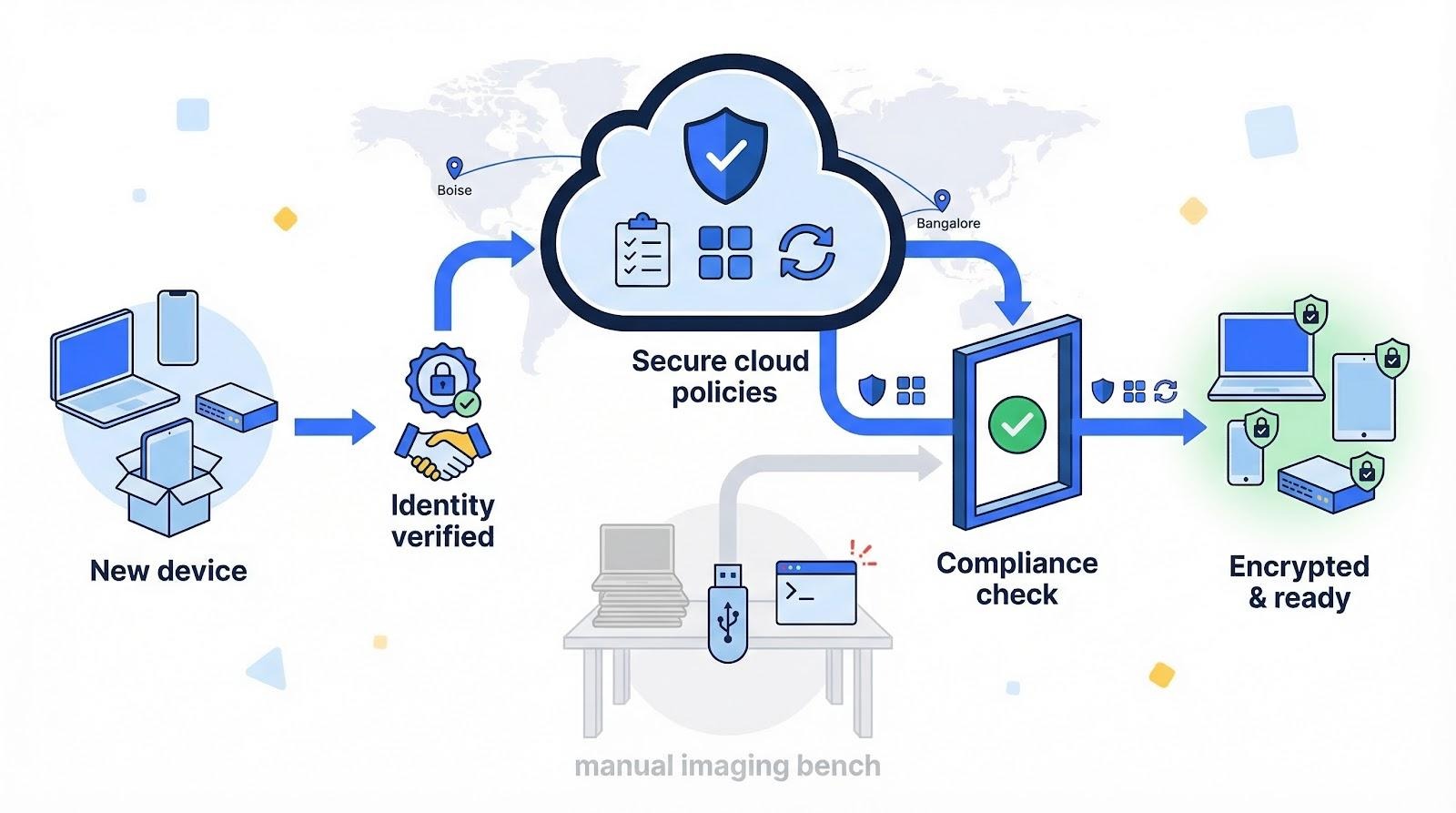
A typical zero-touch provisioning workflow begins when a new device connects to a network, identifies itself to a provisioning service, receives trusted configuration information, and applies the required settings automatically. The exact workflow depends on the hardware, operating system, management platform, and security architecture.
A simplified enterprise workflow looks like this:
Device registered → Device powers on → Identity verified → Provisioning service contacted → Configuration delivered → Security policies applied → Device enrolled → Monitoring begins
Step 1: Register the device
The organization first establishes that the device belongs to its deployment inventory.
Depending on the platform, this can involve:
- Serial numbers
- Device identifiers
- Certificates
- Digital identities
- Ownership records
- Hardware-backed identities
Step 2: Device starts
The device powers on in a factory-default or minimally configured state.
Step 3: Device establishes connectivity
The device obtains enough network connectivity to contact the appropriate enrollment or provisioning infrastructure.
Step 4: Identity is established
The provisioning service determines whether the device is authorized.
This is one of the most important security stages.
Step 5: Trusted configuration is delivered
The system provides the configuration, policies, software, credentials, or management information required by the deployment.
Step 6: Device applies configuration
The device installs or applies the authorized configuration.
Step 7: Device becomes managed
The device connects to its management system and becomes part of the organization's operational environment.
Step 8: Lifecycle management begins
Provisioning is not the end of the process. The device should continue receiving appropriate updates, policy changes, monitoring, and eventual decommissioning or reassignment.
Zero-touch provisioning plays an important role in modern IT lifecycle management by automating device setup, policy enforcement, and software deployment. Organizations using Allwhere for IT equipment procurement can further streamline device procurement, deployment, and lifecycle management while improving security and operational efficiency.
Why does zero-touch provisioning matter for enterprise security?
Zero-touch provisioning can improve enterprise security by making approved device configurations repeatable and reducing dependence on manual setup. A centrally controlled process can help organizations apply security policies consistently across devices and locations.
Manual provisioning creates opportunities for configuration differences.
One administrator may:
- Apply a different firewall rule.
- Forget a security setting.
- Use an outdated configuration.
- Miss a software update.
- Create an incorrect access rule.
- Skip part of the enrollment process.
Automation does not eliminate configuration errors, but it can make the intended configuration reproducible.
Security benefits can include
| Capability | Security value |
| Device identity | Helps distinguish authorized devices |
| Automated policy application | Reduces inconsistent manual configuration |
| Centralized provisioning | Provides centralized control over deployment |
| Secure transport | Protects provisioning communications |
| Configuration validation | Helps prevent unauthorized configuration |
| Certificate-based identity | Supports stronger device authentication |
| Automated enrollment | Reduces unmanaged deployment gaps |
| Lifecycle management | Extends security beyond initial setup |
| Audit logging | Creates records of provisioning activity |
NIST's trusted IoT onboarding work emphasizes establishing trust between a device and network before providing network credentials. It also identifies capabilities such as unique per-device credentials, zero-touch onboarding, configurable trust policies, and continuous assurance.
Is zero-touch provisioning secure?
Zero-touch provisioning is not inherently secure simply because it is automated. It becomes secure when the provisioning architecture verifies device identity, protects communication, validates provisioning information, controls administrative privileges, and maintains appropriate security throughout the device lifecycle.
This distinction is essential.
A poorly designed automated provisioning system can potentially distribute incorrect or malicious configuration at scale.
Security depends on several trust relationships
A secure implementation should consider:
1. Device trust
Can the provisioning service determine that the device is legitimate?
2. Server trust
Can the device verify that it is communicating with the correct provisioning service?
3. Configuration trust
Can the device determine that the configuration or software it receives is authorized and has not been altered?
4. Administrative trust
Are only authorized administrators able to modify provisioning records and policies?
5. Lifecycle trust
Can the organization revoke, reassign, update, or decommission devices securely?
Cisco's Secure ZTP documentation describes this model explicitly: the management system validates the device, the device validates the deployment network, and provisioning data must be protected against tampering.
What is Secure Zero Touch Provisioning?
Secure Zero Touch Provisioning (SZTP) is a standards-based approach for securely bootstrapping network devices from a factory-default state. IETF RFC 8572 defines SZTP and describes mechanisms for obtaining bootstrapping data while establishing appropriate trust between the device and provisioning infrastructure.
RFC 8572 addresses the problem of deploying network devices to locations where sending a specialist to perform initial configuration is impractical. Its model allows a device to bootstrap with limited local intervention.
What makes SZTP different from basic ZTP?
Traditional ZTP implementations can rely on mechanisms such as DHCP to direct a device toward configuration resources.
That does not automatically provide strong authentication.
Secure ZTP introduces additional trust mechanisms.
For example, implementations can use:
- Device certificates
- Trust anchors
- Ownership information
- Secure transport
- Signed provisioning information
- Device authentication
- Server authentication
Juniper's current Secure ZTP documentation describes the use of TPM 2.0, DevIDs, DevID certificates, pinned domain certificates, owner certificates, trust anchors, and vouchers for its implementation.
Cisco's current ZTP documentation similarly distinguishes classic and secure provisioning and describes mutual authentication between a device and bootstrap server using device identity and TLS/HTTPS.
Read IETF RFC 8572: Secure Zero Touch Provisioning
What security controls should zero-touch provisioning use?
A secure zero-touch provisioning architecture should protect device identity, provisioning communications, configuration artifacts, administrative access, and the device lifecycle. The exact controls depend on the platform, but the following security layers provide a practical baseline.
1. Strong device identity
Each device should have a reliable identity that the provisioning system can validate.
Possible mechanisms include:
- Hardware-backed identity
- Device certificates
- Digital device identifiers
- Manufacturer-provided identifiers
- Organization-controlled inventory records
NIST's trusted IoT onboarding research specifically highlights unique per-device network credentials and device authentication as security capabilities.
2. Mutual authentication where supported
A strong provisioning workflow should avoid blindly trusting either side of the connection.
The device should authenticate the provisioning service, while the service should authenticate the device where the architecture supports mutual authentication.
3. Secure transport
Provisioning traffic should use secure communication mechanisms appropriate to the platform.
Cisco Secure ZTP, for example, uses HTTPS/TLS as part of its provisioning workflow.
4. Signed or validated configuration
Configuration files and software packages should come from trusted sources.
The device should have a way to determine whether received provisioning information is authentic and has not been modified.
5. Least-privilege administration
Only authorized personnel and services should be able to:
- Register devices
- Change ownership
- Modify provisioning profiles
- Upload configuration
- Change certificates
- Reassign devices
- Disable security controls
6. Certificate lifecycle management
If certificates are part of the architecture, the organization needs processes for:
- Issuance
- Renewal
- Rotation
- Revocation
- Expiration monitoring
- Secure storage
7. Logging and monitoring
Provisioning activity should be auditable.
Useful events include:
- Device registration
- Enrollment
- Failed authentication
- Configuration changes
- Certificate events
- Provisioning failures
- Device reassignment
- Deprovisioning
8. Secure deprovisioning
Security should not stop at deployment.
When a device leaves the organization, it should be removed from appropriate management and ownership systems, credentials should be handled correctly, and sensitive organizational data should be protected.
How do Android and Apple zero-touch enrollment differ?
Android and Apple both support automated enterprise device deployment, but their mechanisms and terminology differ. Android Enterprise provides zero-touch enrollment for compatible devices, while Apple uses Automated Device Enrollment through Apple Business or Apple School Manager and a compatible device-management service.
Android zero-touch enrollment
Google describes zero-touch enrollment as a method for preconfiguring devices purchased from authorized resellers so they can automatically enroll in an enterprise mobility-management environment during setup.
The general flow is:
Authorized reseller → Device assigned → User powers on → Device contacts provisioning service → EMM enrollment → Policies applied
Samsung's current Knox documentation similarly explains that Android zero-touch enrollment can automatically enroll company-owned devices when the device connects and completes its enrollment process.
Apple Automated Device Enrollment
Apple's Automated Device Enrollment is designed for organization-owned devices and can configure and manage supported devices from the point they are removed from the box. Apple also provides controls that can prevent users from removing device management in supported scenarios.
Comparison
| Area | Android zero-touch | Apple Automated Device Enrollment |
| Primary use | Enterprise Android deployment | Organization-owned Apple devices |
| Enrollment model | Zero-touch enrollment | Automated Device Enrollment |
| Management platform | EMM/Android Enterprise | Device management service |
| Device assignment | Supported through zero-touch infrastructure | Managed through Apple Business/School Manager |
| Automated configuration | Yes | Yes |
| Enterprise policy management | Through EMM | Through MDM/device management |
| Manual deployment | Reduced | Reduced |
| Lifecycle management | Continues through EMM | Continues through device management |
Apple's documentation states that Automated Device Enrollment can configure and manage devices from the moment they are removed from the box, while Google documents zero-touch enrollment as automatic enrollment during device setup.
How should enterprises implement secure zero-touch provisioning?
Secure zero-touch provisioning should be implemented as a complete device-lifecycle process rather than as a simple automation script. Enterprises should define the devices and policies first, establish trusted identity, secure the bootstrap channel, validate configurations, monitor the result, and test recovery and deprovisioning.
A practical implementation process
Step 1: Define the provisioning scope
Document:
- Device types
- Operating systems
- Locations
- Networks
- Users
- Management platforms
- Applications
- Security requirements
Step 2: Create an authoritative device inventory
Every provisioned device should have a reliable record.
The inventory should connect the device identity to:
- Ownership
- Assignment
- Management status
- Provisioning profile
- Lifecycle status
Step 3: Establish device identity
Choose the appropriate identity mechanism for the platform.
For network devices, standards-based approaches such as RFC 8572 may be applicable.
For endpoint devices, platform-specific enrollment systems may be appropriate.
Step 4: Protect the provisioning infrastructure
The provisioning server, management console, identity service, and configuration repository should be treated as sensitive enterprise infrastructure.
Protect them with:
- Strong authentication
- Role-based access
- Least privilege
- Network controls
- Logging
- Monitoring
- Secure secrets management
Step 5: Secure configuration artifacts
Configurations should be:
- Version controlled
- Reviewed
- Access controlled
- Validated
- Protected against unauthorized modification
Step 6: Apply minimum required access
A newly provisioned device should not automatically receive unrestricted access to enterprise resources.
Use staged access where appropriate:
Device identity → Initial policy → Security validation → Required applications → Business resources
This creates an opportunity to verify device posture before granting broader access.
Step 7: Integrate with device management
Zero-touch provisioning should connect to the organization's device-management architecture rather than operate as a disconnected workflow.
For enterprise software environments, this can include cloud infrastructure, APIs, identity systems, endpoint management, monitoring, and existing business applications.
PerfectionGeeks' cloud services describe work across cloud infrastructure and scalable application environments, while its custom software engineering services include enterprise integration and cloud-native solutions.
Step 8: Monitor the provisioning process
Track:
- Successful enrollments
- Failed enrollments
- Authentication failures
- Configuration failures
- Unexpected device identities
- Certificate problems
- Provisioning-service availability
Step 9: Test failure scenarios
Test what happens when:
- The device has no network connection.
- The provisioning service is unavailable.
- The certificate expires.
- The device is not recognized.
- Configuration validation fails.
- A device is stolen before enrollment.
- A device is reassigned.
- A provisioning profile is changed.
Step 10: Test deprovisioning
A secure lifecycle should include:
Provision → Manage → Update → Reassign → Decommission
Not merely:
Provision → Forget
What are the benefits of zero-touch provisioning?
Zero-touch provisioning can improve deployment consistency, reduce manual configuration, support distributed deployments, and make centralized device management easier to scale. Its value is strongest when organizations have repeatable configurations and a large or geographically distributed device fleet.
Key benefits
Faster deployment
Devices can receive their required configuration without requiring an administrator at every physical location.
Consistent configuration
A centrally managed provisioning profile can reduce variation between deployments.
Reduced manual work
IT teams do not need to perform the same initial configuration steps repeatedly.
Remote deployment
Devices can be shipped to branch offices, remote workers, or distributed facilities where local technical support is limited.
Better onboarding control
Device identity and enrollment can be linked to organizational records before access is granted.
Easier scaling
Once the workflow is established, the same process can be used for additional devices without reproducing every manual step.
Cisco describes ZTP as a way to automatically onboard devices without requiring a trained specialist at the deployment site.
What are the risks and limitations of zero-touch provisioning?
Zero-touch provisioning reduces manual effort but creates a highly trusted automation pathway that must itself be protected. If attackers gain control of the provisioning service, device identity records, configuration repository, or administrative credentials, the automation system could potentially distribute incorrect configurations or enable unauthorized devices.
Major risks
| Risk | Potential consequence | Important control |
| Unauthorized device enrollment | Unknown hardware enters management | Device identity validation |
| Compromised provisioning server | Malicious configuration distribution | Server hardening and access control |
| Stolen administrator credentials | Provisioning records altered | Strong authentication and least privilege |
| Configuration tampering | Devices receive unauthorized settings | Integrity validation and change control |
| Certificate compromise | Trust relationship weakened | Secure key management and rotation |
| Incorrect inventory | Wrong device receives profile | Authoritative asset records |
| Service outage | Devices cannot complete onboarding | Resilient provisioning architecture |
| Poor deprovisioning | Former devices retain access | Lifecycle controls |
Real-world security history demonstrates why ZTP endpoints require careful protection. NIST's National Vulnerability Database, for example, records vulnerabilities involving zero-touch provisioning implementations, including a 2025 Arista CloudVision issue involving excessive privileges and older Cisco SD-WAN ZTP vulnerabilities.
These examples do not mean zero-touch provisioning is inherently insecure. They demonstrate why the provisioning infrastructure, permissions, and implementation details must be included in the threat model.
What should enterprises monitor after provisioning?
Successful provisioning is only the beginning of device security. Enterprises should continue monitoring device identity, configuration state, policy compliance, software versions, certificates, management connectivity, and unusual provisioning activity.
Recommended monitoring categories
| Monitoring area | Example signals |
| Identity | Unknown or duplicate device identities |
| Enrollment | Failed or unexpected enrollment |
| Configuration | Unauthorized configuration changes |
| Certificates | Expiration or validation failures |
| Software | Missing required updates |
| Policy | Non-compliant security settings |
| Connectivity | Unexpected management disconnects |
| Access | Unusual administrative activity |
| Lifecycle | Devices not assigned to valid owners |
| Provisioning | Repeated provisioning failures |
NIST's trusted IoT onboarding work extends beyond initial credential provisioning and emphasizes lifecycle management and continued security assurance.
That principle is important for enterprise environments: a device that was securely provisioned can become insecure later.
How does zero-touch provisioning fit into a modern enterprise security architecture?
Zero-touch provisioning should sit between device procurement and ongoing device management, while connecting to enterprise identity, security, networking, and monitoring systems. It is a deployment capability rather than a complete security architecture.
A simplified architecture is:
Device Procurement / Inventory
↓
Device Identity
↓
Zero-Touch Provisioning
↓
Secure Device Enrollment
↓
Configuration + Policies
↓
Identity / Access Controls
↓
Enterprise Network
↓
Applications / Business Data
↓
Monitoring + Lifecycle Management
The architecture should provide clear ownership at every stage.
For example:
- Procurement establishes ownership.
- Inventory establishes the authoritative device record.
- Provisioning establishes the initial state.
- Identity determines who or what the device is.
- Management maintains configuration.
- Security monitoring detects changes and threats.
- Lifecycle management handles reassignment and retirement.
This separation helps prevent the common mistake of treating provisioning as the entire device-security lifecycle.
What is the difference between ZTP, zero-touch enrollment, and MDM?
ZTP, zero-touch enrollment, and MDM overlap but are not interchangeable terms. ZTP generally refers to automated infrastructure or network-device provisioning, zero-touch enrollment commonly refers to automated endpoint enrollment, and MDM provides continuing management of enrolled devices.
| Term | Primary purpose |
| ZTP | Automatically provision infrastructure or network devices |
| Secure ZTP / SZTP | Securely bootstrap network devices |
| Zero-touch enrollment | Automatically enroll endpoints into enterprise management |
| MDM | Manage mobile/end-user devices after enrollment |
| EMM | Broader enterprise mobility management capabilities |
| Device lifecycle management | Manage devices from deployment through retirement |
The distinction matters because an organization may need several of these capabilities in one architecture.
Frequently Asked Questions
Quick answers related to this article from PerfectionGeeks.
1. What is zero-touch provisioning?
2. Is zero-touch provisioning secure?
3. What is Secure Zero Touch Provisioning?
4. How does zero-touch provisioning improve enterprise security?
5. What security controls are important for zero-touch provisioning?
6. What is the difference between ZTP and zero-touch enrollment?
7. Can zero-touch provisioning work for remote offices?
8. Does zero-touch provisioning replace MDM?
9. What happens if a zero-touch provisioning process is compromised?
10. What devices can use zero-touch provisioning?
Conclusion
Zero-touch provisioning is best understood as a secure automation layer for enterprise device deployment—not as a replacement for security or device management. Its value comes from combining automated onboarding with trusted device identity, protected communication, controlled configuration, policy enforcement, monitoring, and lifecycle management.
A mature zero-touch provisioning architecture should answer six questions:
- Is this device authorized?
- Is this provisioning service trusted?
- Is the configuration authentic and intact?
- Does the device meet the organization's security requirements?
- Can the device be monitored and managed after deployment?
- Can its access and ownership be securely removed later?
For network infrastructure, Secure ZTP defined by RFC 8572 provides a standards-based foundation. For enterprise endpoints, platform-specific mechanisms such as Android zero-touch enrollment and Apple Automated Device Enrollment provide automated onboarding capabilities.
Organizations building custom enterprise platforms can also integrate provisioning workflows with cloud infrastructure, identity systems, APIs, monitoring, and device-management platforms. PerfectionGeeks currently provides custom software, cloud, IoT, and enterprise development capabilities that can support these broader technology architectures.

Written By Shrey Bhardwaj
Director & Founder
Shrey Bhardwaj is the Director & Founder of PerfectionGeeks Technologies, bringing extensive experience in software development and digital innovation. His expertise spans mobile app development, custom software solutions, UI/UX design, and emerging technologies such as Artificial Intelligence and Blockchain. Known for delivering scalable, secure, and high-performance digital products, Shrey helps startups and enterprises achieve sustainable growth. His strategic leadership and client-centric approach empower businesses to streamline operations, enhance user experience, and maximize long-term ROI through technology-driven solutions.