Published 12 January 2026 | Updated 12 January 2026
Technology
How to Fix Poor UI/UX Design in Your Existing App: A Step-by-Step Guide
You can pack your app with great features, but if people feel lost or frustrated using it, none of that matters. Clunky design chases users away, and most won’t even tell you why they’re leaving—they’ll just disappear. If you want your app to last, you have to get the UI and UX right. Here’s a simple, practical guide to help you improve your app’s design. You don’t need to be a tech expert to follow along. Each step is straightforward and geared toward making your app easier and more enjoyable without overwhelming anyone.
Why Fixing Poor UI/UX Design Matters
How your app looks and feels shapes everything. If the screens are messy or it’s a pain to get things done, people lose faith fast. They’ll uninstall, leave bad reviews, and move on. Clean, thoughtful design makes your app feel intuitive. People find what they need, understand what to do, and stick around. We’ve seen apps grow faster just by becoming simpler and more pleasant to use.
Signs Your App Needs a UI/UX redesign
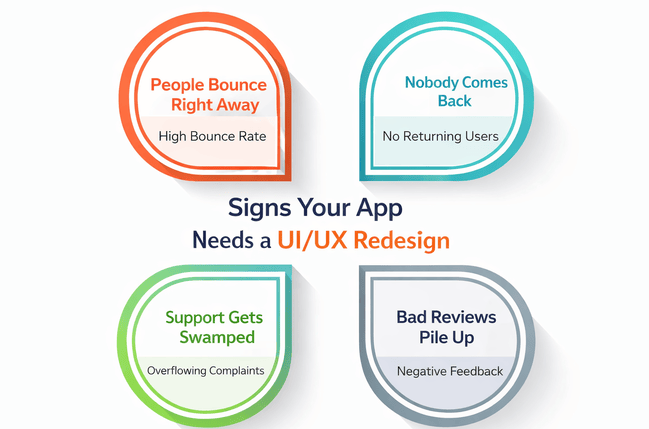
People Bounce Right Away: If users open your app and close it seconds later, they’re probably confused or annoyed. That’s a big red flag—your design is pushing them out.
Nobody Comes Back: When people don’t return after trying your app once or twice, it means the experience just didn’t click. A redesign can make things more inviting and build trust.
Support Gets Swamped: If you’re flooded with questions about basic features, the design isn’t doing its job. Good UI/UX should guide users so well, they barely need help.
Bad Reviews Pile Up: If reviews mention words like “confusing,” “hard to use,” or “bad design,” you’ve got clear feedback—your UI/UX needs work. Don’t ignore it.
Real-Life App Rescue Through UI/UX Redesign
One of our clients came to us with a shopping app. The products were great, but sales? Not so much. Users kept saying the app was hard to use and the checkout took forever. So, we rolled up our sleeves and dove into a full UI/UX audit to see what was actually driving people away. We didn’t just slap on a new look. We went screen by screen, made navigation easier, put buttons where people expect them, and cut down the steps to check out. Three months later, the numbers spoke for themselves—a 40% jump in completed purchases and a flood of better reviews. Honestly, a good UI/UX redesign can turn things around fast.
5 Essential Steps to Successfully Redesign Your App’s UX
Step 1: Dig Into a UI/UX Audit
You can’t fix what you don’t understand. That’s why a solid audit comes first. We check out how users move through the app, pore over heatmaps, collect feedback, and map out the navigation. This gives us a clear picture of what’s broken and why people are getting frustrated. Skip this step, and you’re just guessing.
Step 2: Pinpoint the Real Problems
After the audit, we list out the main headaches users run into—cluttered screens, buttons that don’t make sense, weird color choices, menus that go nowhere. Each problem ties back to something users actually struggle with. Once you see the real pain points, you can fix them with purpose, not just shuffle things around.
Step 3: Plan the Redesign, One Step at a Time
Jumping straight into a redesign without a plan? That’s asking for trouble. We lay everything out: wireframes, content order, smoother navigation. Every change has a job to do. We stick to best practices so the redesign feels clean and familiar, not awkward or forced.
Step 4: Test With Real People
Once the new design is ready, we put it in front of actual users. Sometimes what’s obvious to a designer still trips people up. User testing shows us what works and what needs more tweaking. Even small fixes here can make the app way easier to use.
Step 5: Launch, Watch, and Keep Improving
Rolling out the new version isn’t the end. We keep an eye on how people use it, read the reviews, and track performance. App UI/UX isn’t a one-and-done thing it’s ongoing. We help clients keep things running smoothly and make small updates so the app always feels fresh and easy to use.
Why PerfectionGeeks Stands Out
At PerfectionGeeks, we’re not just giving your screens a facelift. We’re rethinking the whole experience. We actually pay attention to what real people want, instead of just chasing the latest trends.
We mix solid UI/UX know-how with data and a bit of gut instinct about how people feel. The result? Apps people actually like to use. Clients don’t just walk away with prettier screens they see genuine growth.
The Power of Good UI/UX
When an app feels easy and natural, people relax. They don’t get annoyed or confused, so they stick around. That sense of comfort leads to real loyalty.
We design with that in mind. Our goal is to make users feel like the app was built just for them. Trust grows, things get easier, and people want to come back. That’s what sets us apart.
Frequently Asked Questions
Quick answers related to this article from PerfectionGeeks.
1. How do I know my app has poor UI/UX design?
2. How long does a UI/UX redesign take?
3. Why choose PerfectionGeeks for UI/UX redesign?
Conclusion
Fixing bad UI or UX isn’t just about making your app prettier. It’s really about helping people feel at home, trust what they’re doing, and actually enjoy using your product. When you follow these steps, you don’t just patch up design flaws you make your app easier to use and let it grow in a way that feels natural.At PerfectionGeeks, we’ve got your back through the whole process, from the first audit all the way through redesign and ongoing tweaks. We know great user experiences start with understanding real people. That’s where we shine.

Written By Shrey Bhardwaj
Director & Founder
Shrey Bhardwaj is the Director & Founder of PerfectionGeeks Technologies, bringing extensive experience in software development and digital innovation. His expertise spans mobile app development, custom software solutions, UI/UX design, and emerging technologies such as Artificial Intelligence and Blockchain. Known for delivering scalable, secure, and high-performance digital products, Shrey helps startups and enterprises achieve sustainable growth. His strategic leadership and client-centric approach empower businesses to streamline operations, enhance user experience, and maximize long-term ROI through technology-driven solutions.